Redprint Studios

Stock planning for Shopify clothing brands

Know what to reorder,
in which sizes, and when.

Every morning you get a plan built from your own Shopify sales: which styles and sizes to order, how many, from which supplier and by what date. Each number comes with the reason behind it, so you can check it before you buy.

Try it free for 30 days See the demo

Nothing to pay and no commitment.

Sample Brand Co. · Today’s plan Demo data
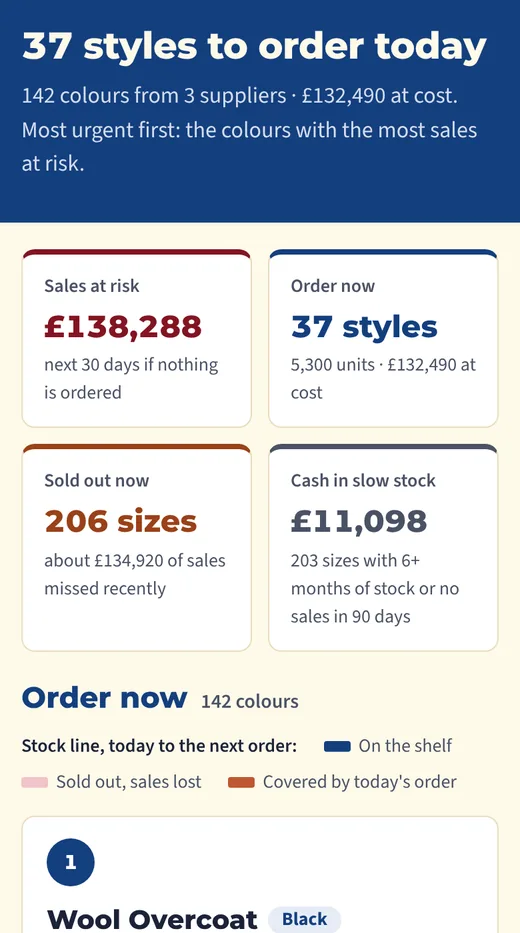
The dashboard running on a made-up brand, Sample Brand Co. (demo data): summary tiles for sales at risk, styles to order now, sold-out sizes and cash in slow stock, then order cards grouped by supplier and a list of sizes that need a check.

01The demo

The plan for a made-up brand

This is the real dashboard, running on a made-up clothing brand with 300 products. Open it and click “Why these numbers” on any style to see how each quantity was worked out.

Sample Brand Co. · 300 products · demo data

Open the demo dashboard
Why these numbers · Fleece Pullover Demo data
Why these numbers, opened on the Fleece Pullover card in the demo (made-up brand): the working behind each size’s order quantity.
Fig. 02 — Why these numbersMade-up brand, demo data
Demo figures Made-up brand

Sales at risk

Next 30 days, if nothing is ordered

£20,802

Order now

520 units · £12,610 at cost

28styles

Sold out now

Sizes with no stock today

106sizes

Cash in slow stock

Stock that isn’t moving

£23,756

What the plan shows

What to order now

Units per colour and size for each style, grouped by supplier, with the date to order by and when it lands.

Why each number

How fast each size sells, what’s in stock and on order, and how many you need to last until your next order.

What needs a look

Sizes selling faster than usual, styles with high returns, and cash tied up in stock that isn’t moving.

02How it works

Set up once, then a plan every morning

  1. Connect your store

    Read-only access. It can see products, stock and sales, and it can’t change anything.

  2. Add your suppliers

    Who makes what, how long each takes to deliver, and anything already on order.

  3. Get the daily plan

    Each morning, updated from your latest sales: what to order, how many, and by when.

  4. You decide

    Check the plan against how you’d normally buy, then place the orders you agree with.

Setup takes about an hour of your time, most of it listing suppliers and what’s already on order.

03Your data

Read-only, and only what the plan needs

The plan works from your products, stock and sales. That’s all it reads from your store.

Store access Read-only
Reads Products, stock and sales
Never asks for Customer names, emails or addresses
Can change Nothing

It can’t change your store

Access is read-only, so it can see your store but can’t edit anything in it.

No customer details

I never ask for names, emails or addresses. The plan doesn’t need them.

Never shared or sold

Your data isn’t shared with anyone, and it’s never sold.

Deleted when you stop

If you stop using it, I delete your data.

04Free for 30 days

Try it on your own store

I’ll set it up with you, you run it alongside how you buy now, and at the end you tell me honestly whether it helped. There’s nothing to pay and no commitment.

Or email me directly: jackparry@redprintstudios.com

Jack ParryRuns Redprint Studios from Liverpool
Demo data · made-up brand
The demo plan on a phone, for a made-up brand.